· Nas · Technology · 19 min read
How to Use JEV by TypeSafe AI - The Fast, Cheap Model Built for Workflow Automation
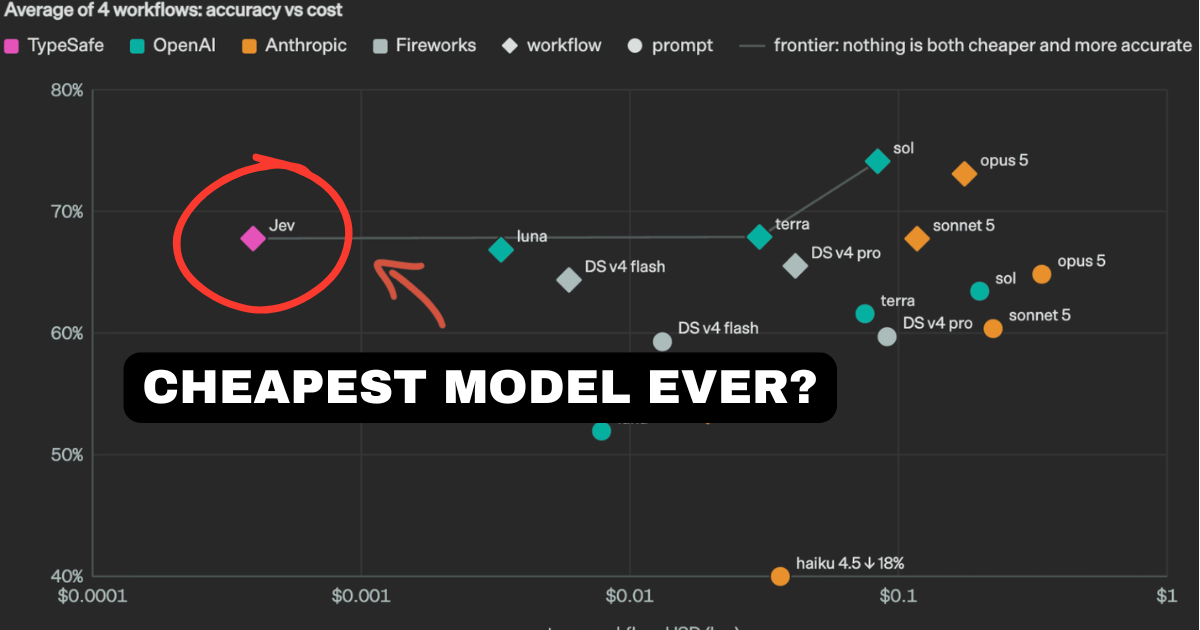
TypeSafe AI just launched Jev, a model that answers in 70-500ms, charges $0.042 per million input tokens, and gives you free output. Here's how it works, how to use it, and what it's actually for.
How to Use JEV by TypeSafe AI
There’s a question that’s been quietly bothering people who build with AI, and TypeSafe AI’s founder Diogo Almeida put it better than anyone I’ve seen:
“Models have been superhuman at chat for years, so where is all the automation?”
He’s right, and if you’ve tried to automate anything real with an LLM you already know why. You ask a model to decide something simple - is this customer angry, which team should handle this, is this invoice a duplicate - and you get back a paragraph of text you then have to parse, validate, and pray isn’t hallucinated. It takes three to eight seconds. It costs real money at volume. And it fails in ways your code can’t catch.
On 15 September 2026, TypeSafe AI released Jev, and it’s built specifically for that problem. It answers in 70 to 500 milliseconds, costs $0.042 per million input tokens, and the output tokens are free.
This post covers what Jev is, how it works, how to actually use it, and - just as importantly - where it doesn’t belong.
Here’s what we’ll cover:
- What Is a System One Model?
- The Cost and Speed Numbers
- How Jev Actually Works
- How to Use JEV: Step by Step
- What You’d Actually Build With It
- Where Jev Does Not Fit
- Jev vs an LLM: Which for What
- Frequently Asked Questions
Prefer to watch instead? I break down everything you need to know about Jev in the video below:
What Is a System One Model?
TypeSafe describes System One Models as “a new class of frontier models built to make fast, structured decisions that software can use directly.”
The name comes from Daniel Kahneman’s Thinking, Fast and Slow, which splits human thinking into two systems. System 1 is fast, intuitive, automatic - the judgment you make in a fraction of a second without deliberating. System 2 is slow, effortful, deliberate - the reasoning you do when you actually sit down and work something out.
Every LLM you’ve used is a System 2 machine. It reasons, it deliberates, it writes you an essay. That’s brilliant when you want an essay. It’s absurd when all you needed was a yes.
Jev is the System 1 half. Instead of returning text, it returns typed, structured values - a choice from a list, a score on a scale, a probability between 0 and 1. The company’s own framing is the clearest description of what you’re getting:
“Think of Jev as a frontier-intelligence function call: unstructured state in, typed probabilistic decisions out.”
That’s the whole idea. Not a chat partner. A function you can call from your code that happens to have frontier-level judgment inside it.
The name, incidentally, comes from William Stanley Jevons, the economist behind the Jevons paradox - the observation that when steam engines got more efficient, coal consumption went up rather than down, because cheaper energy unlocked entirely new uses for it. TypeSafe is betting machine intelligence follows the same curve. It’s a confident name.
The Cost and Speed Numbers
This is the part that makes people sit up, so let’s put it plainly.
| Jev | Typical frontier LLM | |
|---|---|---|
| Input cost | $0.042 per million tokens | $2 - $10 per million tokens |
| Output cost | Free - “too cheap to meter” | Roughly 5x the input rate |
| End-to-end response | 70 - 500ms | 3 - 329 seconds |
| Output | Typed structured values | Natural language text |
A few of these deserve unpacking.
Free output tokens are genuinely unusual. On every LLM you’ve used, output is the expensive half - typically around 5x the input rate. TypeSafe charges nothing for it, describing it as “too cheap to meter.” That’s possible because Jev’s outputs aren’t long strings of generated text; they’re structured values from a set of options you defined in advance.
The speed gap is 40x to 200x for equivalent intelligence on structured tasks. In TypeSafe’s own head-to-head demo, Jev returned in 0.114 seconds against 8.566 seconds for GPT-5.6 Terra. That’s not a marginal improvement, it’s a different category of thing - the difference between an automation you run nightly in a batch and one that runs inline while a user waits.
On cost, The Register put the comparison at roughly 238x cheaper than Claude Fable 5.1. Now, Fable 5.1 is Anthropic’s most capable model, built for demanding reasoning and long-horizon agentic work, and I wrote about when it’s actually worth paying for recently. Comparing it to Jev on price is a bit like comparing a research team to a calculator. But that’s rather the point: if the job is “which of these four departments should this ticket go to,” you were never getting value from the research team.
There’s a concrete illustration in the launch post. Their Doom-playing demo runs at roughly 10 queries per second for about $7 an hour. Try that with a frontier LLM and you’d be looking at a bill that ends the experiment.
How Jev Actually Works
Three things make the numbers above possible, and they’re all architectural rather than clever prompting.
It samples in parallel, not sequentially
A normal LLM generates one token, looks at what it just wrote, generates the next, and repeats. That sequential loop is why response time scales with output length and why you sit watching text stream in.
TypeSafe built a new model architecture optimised for parallel sampling, with a sampler that generates all outputs simultaneously rather than one after another. Remove the sequential loop and you remove the main source of latency.
It cannot hallucinate
This claim sounds like marketing until you see the mechanism, and then it’s almost boring.
Jev’s possible outputs are defined in advance by you. When you ask it to route a ticket to billing or technical, those are the only two values it can physically return. The response is guaranteed to match your schema. There’s no generation step where it could invent a third department, no string to parse, no type error to handle downstream.
So it’s not that Jev has been trained out of hallucinating. It’s that the output space doesn’t contain anything to hallucinate into. As the company puts it, Jev “can’t hallucinate” - and structurally, that holds.
It was trained to be honest about uncertainty
TypeSafe trained Jev with a method they call RLCD, Reinforcement Learning for Calibrated Decisions, aimed at producing epistemically honest probability estimates.
This is the most underrated part of the whole thing. Jev doesn’t just tell you the answer, it tells you how confident it is - and that confidence is meant to be calibrated, meaning when it says 70% it should be right about 70% of the time. That number is what makes real automation possible, because it lets your code decide when to act automatically and when to escalate to a human. An LLM that says “I’m fairly confident” in prose gives you nothing you can branch on. A calibrated 0.94 does.
The company’s summary of where this lands:
“Jev achieves similar levels of intelligence on System One tasks compared to existing LLMs, while being two orders of magnitude faster and more efficient.”
How to Use JEV: Step by Step
Jev is in early access at the time of writing, so step one is getting in.
Step 1: Join the waitlist and get your key
Sign up for early access at typesafe.ai. Once you’re through, your API key comes from the TypeSafe console.
Step 2: Install the SDK
There’s a Python SDK (requires Python 3.10 or newer) and a JavaScript client. For Python:
pip install typesafe-sdkStep 3: Set your API key
export TYPESAFE_API_KEY="your-key-here"Step 4: Learn the three question types
This is the only genuinely new concept, and there are just three. You give Jev a state (the unstructured input - a message, a document, a JSON blob) and a set of questions to evaluate against it:
Noul- a truth value. “Is this true?” Returns a number from 0 to 1.Choice- pick one option from a list you define. Returns the choice plus a probability distribution.Score- rate the state on a rubric or spectrum. Returns a score plus probabilities.
All three come back with confidence attached.
Step 5: Make your first call
Here’s a working example straight from TypeSafe’s quickstart, classifying a customer support message three different ways in a single request:
from typesafe_sdk import Choice, Noul, Score, TypeSafeClient

client = TypeSafeClient()

response = client.system_one(
    state="Hi, I've been trying to connect my Stripe account for 3 days and it keeps failing.",
    questions={
        "urgency": Noul(
            instructions="Does this message express urgency?"
        ),
        "department": Choice(
            instructions="Which team should handle this",
            criteria={
                "billing": "Payment issues",
                "technical": "Integration problems"
            }
        ),
        "frustration": Score(
            instructions="How frustrated is the customer",
            criteria=["Calm", "Frustrated", "Very angry"]
        )
    }
)

print(response.answers["urgency"].noul)       # 0.999
print(response.answers["department"].choice)   # "billing"
print(response.answers["frustration"].score)   # 1.035
Look at what you get back: a number, a string from a set you defined, and another number. No parsing. No JSON repair. No try/except around a model that decided to explain itself this time. Three typed values your code can branch on immediately, returned in well under a second.
That’s the entire learning curve. If you can write an if-statement, you can use Jev.
The full documentation covers the SDK references, the HTTP API, and 16+ cookbooks. There’s also an evals site if you want to see how it performs on workflow tasks before committing.
Build it, don't just read about it
Build your beautiful website today
New models land every month. What doesn't change is needing something real to plug them into. My complete step-by-step pack takes you from a blank screen to a live website on your own domain - plus a private 1-on-1 call with me.
Build My Website With Claude →Lifetime access · Beginner friendly · No code needed
What You’d Actually Build With It
This is where it gets interesting for anyone doing workflow automations, because Jev fits a shape of problem that LLMs have always handled badly.
Smart if-statements. TypeSafe’s own framing, and the best one. Every automation you’ve built has decision points where a simple rule isn’t quite good enough - “if the email is urgent,” “if this lead looks serious,” “if the review is negative.” Regex can’t judge that. An LLM can, but at three seconds and real cost per call. Jev sits exactly in that gap: frontier judgment at the price and speed of a database lookup.
Routing and triage at volume. Support tickets to the right team, leads to the right salesperson, documents to the right folder. The example above is this, and it’s the single most obvious use.
Map-reducing over big data. Run a judgment call across every row in a large dataset. At $0.042 per million input tokens with free output, classifying ten thousand records stops being a budget conversation.
Real-time applications. Anything where a human is waiting. At 70-500ms you can put an AI decision inside a live request without the user noticing - which is simply not possible at three to eight seconds.
Confidence-gated routing. This is the pattern I’d reach for first, and it’s covered in TypeSafe’s docs alongside others like speculative fan-out, composite scoring, and intent routing. The logic: if Jev’s confidence is above your threshold, let the automation act. If it’s below, escalate to a human or hand off to a slower, more capable model. You get automation on the easy 90% and human judgment on the hard 10%, decided by a calibrated number rather than a guess.
If you’ve been building automations with tools like Zapier - I walked through that approach in how to automate your Shopify orders with Zapier - this is the missing piece those workflows always had. The plumbing was never the hard part. The hard part was the step in the middle that needed judgment, and that’s precisely what Jev is for.
It’s also worth understanding how this fits alongside agents more broadly. If that’s unfamiliar territory, start with what MCPs are and how to build your first AI agent, because Jev makes far more sense once you’ve felt the pain it’s solving.
Where Jev Does Not Fit
I’d be doing you a disservice if I presented this as a replacement for the models you already use. It isn’t, and TypeSafe isn’t claiming it is.
It doesn’t write anything. No copy, no code, no emails, no summaries. If your task ends with a human reading prose, Jev is the wrong tool. Use Claude or another LLM.
It doesn’t reason through open-ended problems. It’s the System 1 half by design. Multi-step reasoning, research, planning, “think about this carefully” - that’s System 2 work and it belongs elsewhere.
You have to define the output space up front. The no-hallucination guarantee comes from you specifying the possible answers in advance. If you don’t know what the options are, Jev can’t help you find out.
It’s early access. You need to get through the waitlist, and it’s a brand new company - $40 million led by DCVC, built over roughly two years, but still a startup you’d be adding to your critical path.
And one honest caveat on the headline claim. The Register noted that calling Jev hallucination-free “really isn’t a fair comparison as its output is not natural language.” That’s a fair hit. Jev can’t hallucinate a fake citation because it can’t produce a citation at all - but it can absolutely return a confident wrong answer within your schema. The structural guarantee is about types, not about truth. Treat the confidence score as your actual safety net, not the schema.
Jev vs an LLM: Which for What
| If the task is… | Use | Why |
|---|---|---|
| Classify, route, score, or decide | Jev | Milliseconds, typed output, near-zero cost |
| Write copy, code, or a summary | An LLM | Jev produces no text |
| A judgment inside a live user request | Jev | 70-500ms fits inside a request; 8 seconds doesn’t |
| Open-ended reasoning or research | An LLM | System 2 work by definition |
| The same decision across 10,000 rows | Jev | Free output makes volume affordable |
| Decide, then act on the decision | Both | Jev gates it, the LLM does the writing |
That last row is the real answer for most people. These aren’t competitors. Jev is the fast, cheap judgment layer that decides whether and where, and your existing model does the expensive work only when Jev says it’s warranted. Used that way, Jev can meaningfully cut what you spend on your main model - the same instinct behind reducing your token usage, applied at the architecture level rather than the prompt level.
Your turn to build
Build your beautiful website today
Models like Jev matter once you have something running. My complete step-by-step pack takes you from a blank screen to a real website, live on your own domain - with a private 1-on-1 call with me included.
Build My Website With Claude →Lifetime access · Beginner friendly · No code needed
Want to build it together, live? Apply for the 1-month mentorship → · Prefer it done for you? Get in touch →
Frequently Asked Questions
What is JEV by TypeSafe AI?
Jev is TypeSafe AI’s first public System One Model, released on 15 September 2026. TypeSafe describes System One Models as “a new class of frontier models built to make fast, structured decisions that software can use directly.” Rather than generating text like a chatbot, Jev takes unstructured input and returns typed, structured values - a choice, a score, or a probability - with a calibrated confidence attached.
How much does JEV cost?
Jev costs $0.042 per million input tokens, and output tokens are free, described by TypeSafe as “too cheap to meter.” That’s a sharp break from LLM pricing, where output typically costs around 5x the input rate. For scale, TypeSafe’s Doom demo runs at roughly 10 queries per second for about $7 an hour.
How fast is JEV compared to an LLM?
Jev returns end-to-end responses in 70 to 500 milliseconds, which TypeSafe puts at 40x to 200x faster than frontier LLMs on equivalent structured tasks. In their own head-to-head demo, Jev responded in 0.114 seconds against 8.566 seconds for GPT-5.6 Terra. The speed comes from parallel sampling, which generates all outputs at once instead of one token at a time.
How do I use JEV?
Join the early access waitlist at typesafe.ai, get an API key from the TypeSafe console, then pip install typesafe-sdk (Python 3.10+) and set TYPESAFE_API_KEY as an environment variable. You call client.system_one() with a state (your unstructured input) and a set of questions built from three types: Noul for truth values, Choice for picking from options, and Score for rating on a scale. A JavaScript client is also available.
Can JEV really not hallucinate?
Structurally, yes - but read the claim carefully. Jev’s possible outputs are defined by you in advance, so the response is guaranteed to match your schema and it cannot invent an option that doesn’t exist. What it can do is return a confident wrong answer from within your defined set. The Register made this point fairly, noting the comparison “really isn’t a fair comparison as its output is not natural language.” The guarantee is about types, not truth, which is why the calibrated confidence score matters more than the schema.
Is JEV a replacement for Claude or GPT?
No, and it isn’t trying to be. Jev produces no text at all - no copy, no code, no summaries - and doesn’t do open-ended reasoning. It’s the fast, intuitive System 1 half; LLMs are the deliberate System 2 half. The strongest pattern is using both: Jev makes the cheap fast decision about whether and where to act, and your LLM does the expensive work only when Jev’s confidence says it’s warranted.
What can I build with JEV for workflow automation?
The clearest use is what TypeSafe calls smart if-statements: the decision points in your automations where a simple rule isn’t good enough but an LLM is too slow and expensive. That covers support ticket routing, lead qualification, content moderation, document classification, and map-reducing a judgment across large datasets. The pattern worth learning first is confidence-gated routing - automate when Jev is confident, escalate to a human when it isn’t.
Who is behind TypeSafe AI?
TypeSafe AI was founded by Diogo Almeida, a former OpenAI researcher, co-inventor of ChatGPT and one of the co-inventors of reinforcement learning from human feedback (RLHF). The company launched Jev on 15 September 2026 with $40 million in funding led by DCVC, after roughly two years of development.
What does the name JEV mean?
Jev is named after William Stanley Jevons, the economist behind the Jevons paradox - the finding that more efficient steam engines increased coal consumption rather than reducing it, because cheaper energy unlocked new uses. TypeSafe expects machine intelligence to follow the same path, with each drop in the cost of intelligence opening up use cases that weren’t viable before.
Nas’ Note
I’ll be honest: my first reaction to “new model launch” is usually a sigh. Most of them are a slightly better version of what we already had.
This one is different because it isn’t competing on the same axis. Jev isn’t trying to be smarter than Claude or GPT. It’s trying to be the part of your stack those models were never right for - the thousand small decisions that sit between your data and your actions, which we’ve been badly handling with either brittle rules or a frontier model swatting a fly.
The real test isn’t the benchmarks, it’s whether the 70-millisecond response changes what you’re willing to build. When a judgment call costs effectively nothing and returns before a user notices, you start putting intelligence in places you’d never have bothered - every routing decision, every filter, every “should we flag this.”
That’s the Jevons bet in the name, and it’s a smart one.
If you’re already automating things and you keep hitting the same wall - the step that needs judgment but can’t afford a three-second LLM call - this is worth your waitlist signup. If you’re not building anything yet, a new model won’t help you. Build something first, then come back when you hit that wall. You’ll know it when you do.
Liked what you just saw? Follow me on Youtube or connect on LinkedIn for more insights on building with AI.
Video Guides you might like:
 How to use Claude Code to build Apps
  10 Best Claude Code Skills for beginners
  How to create AI Video Animations with Claude + Remotion
  How to use Claude Code to build a Website
  How to use Claude Skills for beginners
  How to write the PERFECT CLAUDE.md file
  Automate 80% of your Marketing with Claude
  How to use Claude Code — The basics
  Work 2X Faster with Claude Cowork
  How to NEVER Hit Claude Usage Limits Again