· Nas · Technology · 7 min read
Why Claude Gets Worse the Longer You Use It (Context Rot Explained)
If Claude feels like it gets dumber the longer a conversation runs, you are not imagining it. The cause is context rot, and there are three simple habits that keep your AI sharp.
Why Claude Gets Worse the Longer You Use It
Have you ever noticed that Claude seems to get progressively dumber the more you use it inside a single conversation? You start with sharp, detailed answers, and a few hours later the same model is forgetting your instructions, dropping details, and giving you replies that feel half asleep. You are not imagining it, and the fix has very little to do with the prompts you write.
This usually has nothing to do with the model you are running or the quality of your prompting. The real culprit is a phenomenon called context rot, and once you understand how it works you can avoid it almost entirely.
What Is Context Rot?
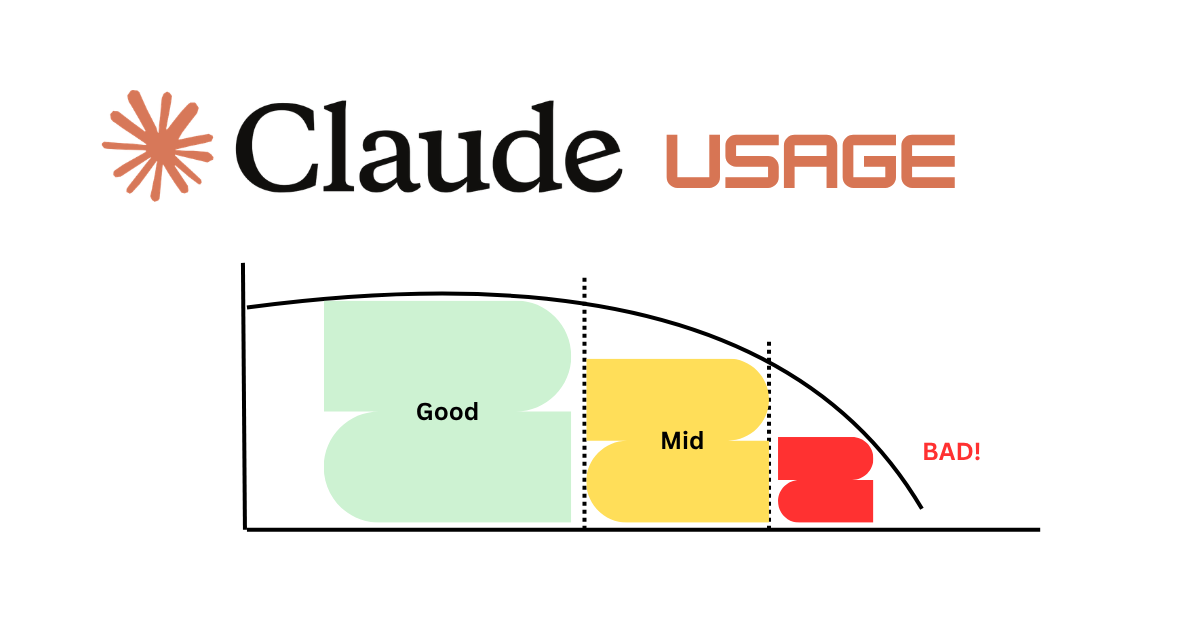
Context rot is the gradual decline in the quality of an AI model’s responses as a conversation gets longer and the context window fills up with tokens. Every message you send, every file you paste, and every reply Claude generates adds more tokens to the running history of the chat. As that history grows, the model has to hold more and more information in working memory at once, and the quality of its attention starts to degrade.
Researchers at Chroma documented this effect in detail in their Context Rot report, which showed that model performance is not uniform across a long context. In plain terms, a model that performs brilliantly with a short, focused prompt can become noticeably less reliable once you bury that same instruction under tens of thousands of tokens of conversation. The information is technically still there, but the model treats it as less important than the chatter that surrounds it.
Anthropic explains the underlying mechanics in its documentation on context windows, which describes how Claude reads the entire conversation on every single turn. The longer that conversation becomes, the more competing signals Claude has to weigh before it answers you.
The Three Things That Quietly Break Long Conversations
Context rot is really a combination of three separate problems that compound as you keep chatting.
The first problem is simply having too many tokens in a chat. When the conversation gets long enough, Claude starts to lose track of the instructions you gave it at the very beginning, because those early messages are now sitting far away from the part of the conversation it is actively focused on. The result is that carefully crafted system prompt you wrote an hour ago quietly stops being followed.
The second problem shows up during auto-compaction. When a chat approaches the limit of the context window, the system compresses older parts of the conversation to make room for new messages. That compression is helpful, but it is not perfect, and important details sometimes fail to carry over. You end up explaining the same thing twice because the model genuinely no longer has the original version.
The third problem is the most frustrating one, because it is invisible. As the context fills up, the effective effort the model puts into each response can quietly drop, so the answers feel lazier even though nothing about your request changed. You did not get worse at prompting, and Claude did not get a worse model. The conversation simply aged past the point where it could perform at its best.
How to Fix Context Rot
The good news is that keeping Claude sharp does not require any special tools or settings. It comes down to three habits that you can start using today.
1. Start a fresh chat every twenty messages or so
The single most effective fix is also the simplest one. Once a conversation has run for roughly twenty back-and-forth messages, open a new chat and bring only the essential context with you. A fresh conversation gives Claude a clean, short context window where every instruction you provide carries full weight, and you will immediately notice the difference in how closely it follows your lead. Think of it less as losing your progress and more as giving the model a clear desk to work on.
2. Use the /clear command to reset your context
If you are working inside Claude Code or a similar environment, the /clear command wipes the old conversation and refreshes your context without forcing you to abandon the session entirely. It is the fastest way to flush out stale parameters and accumulated noise so that Claude focuses only on what matters right now. This is one of many underrated commands worth learning, and I cover a full set of them in my guide to the best Claude hacks and secret codes. Pairing a regular /clear with shorter sessions will solve the majority of context rot you run into day to day.
3. Create a handoff file when the work is complex
For longer projects that genuinely span many sessions, the most reliable move is to maintain a handoff.md file that travels with the work. A good handoff file captures the goal of the project, its current state, what has already changed, what you tried that did not work, and the next steps you want to take. When you start a fresh chat, you paste that file in first, and Claude picks up exactly where the previous session ended without dragging along thousands of tokens of dead conversation.
This is closely related to the idea behind a project memory file, and if you want to go deeper on structuring one properly, I walk through the whole approach in my post on how to write a CLAUDE.md file. The same discipline that keeps your token usage under control, which I cover in how to reduce Claude tokens and avoid usage limits, is exactly what protects you from context rot, because the two problems share the same root cause.
The Takeaway
Claude is not getting dumber, and you are not getting worse at using it. Long conversations simply accumulate more tokens than the model can weigh effectively, and that quiet decline is what people mistake for a worse AI. Once you start fresh chats regularly, lean on /clear to reset your context, and keep a handoff file for anything serious, you keep the model operating at the level it was built for.
Give these three habits a try in your next session, and pay attention to how much more closely Claude follows your instructions when the context is clean.
Put it into practice
Build your beautiful website today
Now you know how to keep Claude sharp - use it to build something real. My complete step-by-step pack takes you from a blank screen to a real website, live on your own domain - plus a private 1-on-1 call with me.
Build My Website With Claude →Lifetime access · Beginner friendly · No code needed
Prefer it done for you? Get in touch →
Liked what you just saw? Follow me on Youtube or connect on LinkedIn for more daily AI tips that keep you ahead.
Video Guides you might like:
 How to use Claude Code to build Apps
  10 Best Claude Code Skills for beginners
  How to create AI Video Animations with Claude + Remotion
  How to use Claude Code to build a Website
  How to use Claude Skills for beginners
  How to write the PERFECT CLAUDE.md file
  Automate 80% of your Marketing with Claude
  How to use Claude Code — The basics
  Work 2X Faster with Claude Cowork
  How to NEVER Hit Claude Usage Limits Again